
How to Setup Mobile Photo Uploads From Your Device
| How to Setup Mobile Photo Uploads From Your Device | |||||
BisManOnline lets you use your mobile phone (compatible with Android and iPhone 4 and 5), to take pictures and send them directly to your BisManOnline Member Directory for creating your next ad. Here's 6 easy steps to set up your mobile phone for this feature. |
|||||
Step 1.) First, make sure you're logged into your BisManOnline account, this will allow you to continue to the next step. By clicking on the settings icon in the upper-right corner, you will be brought to the account settings page in your Member Center.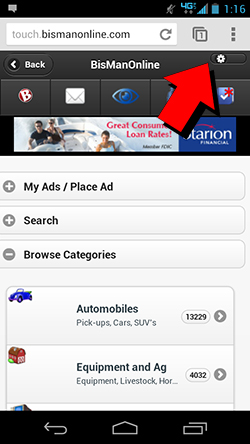 |
|||||
Step 2.) Next, you will want to select the "Mobile Account Settings" shown on the left. 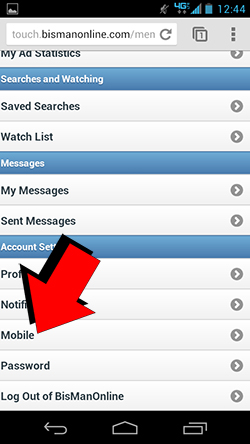 |
|||||
Step 3.) Once you've done that, you'll be taken to the next step. Here, you'll want to click the button "Enable Mobile for my Account." This will let you not only allow you to complete mobile photo uploads as shown in this guide, but other things like text notifications from BisManOnline. You'll also want to enter the phone number for the mobile phone you plan to use. After you select your mobile phone provider, click "Submit" to continue. 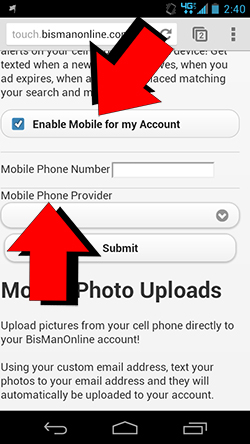 |
|||||
Step 4.) The next page will have a variety of mobile options that are available to you. In this case, you'll want to click the "Mobile Settings" link outlined in blue. .jpg) |
|||||
Step 5.) At this point, you'll arrive at the Mobile Photo Uploads page. At this point, you will want to click the text in blue shown to the right that says "Generate a Mobile Upload Email Address." This will create a unique email address that is specific to your BisManOnline account. Once you've clicked this, the page will update with your new mobile upload email address. 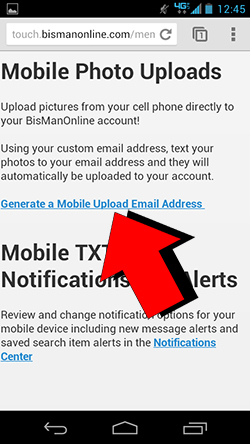 |
|||||
Step 6.) Now that you have your new mobile upload email address which is tied into your BisManOnline membership, you can begin any time. There is text below your new address which details how to complete the process of uploading photos with your mobile phone. As indicated on the right, simply save the generated address to your phone's contacts and you can now text any desired pictures to this contact. Your BisManOnline member center will receive this picture in a matter of minutes and you will then be ready to start posting your ad. 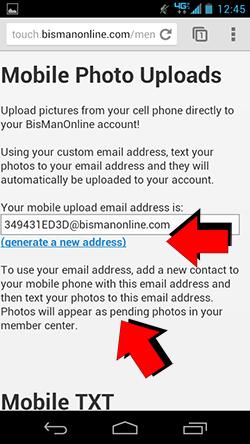 |
|||||
You can also use BisManOnline on your computer or non-mobile device to set up your mobile upload e-mail address. Check out these step
Step 1.) First, make sure you're logged into your BisManOnline account, this will allow you to continue to the next step. Then continue by clicking on the Member Center icon.
.jpg)
Step 2.) Next, you will want to click on the "Account" icon shown by the arrow below. This will take you to your account settings.
.jpg)
Step 3.) Once you've done that, you will have to click on the "Mobile" button under "Account on the left-hand side. You will see the correct button to click by the arrow in this example.
.jpg)
Step 4.) You will now be at your Mobile Settings page. Here, you will have to enter your mobile phone number, including area code and select your mobile phone provider from the drop-down list. After you've done this, you can click on the "Submit" button.
Once the above information is processed, you will be able to click on the blue text below, "(generate a new address)" if you do not have a mobile upload e-mail address already. This will be a special e-mail address where you can upload photos from your mobile phone. It is recommended that you enter this e-mail address as a contact on your mobile phone for added ease of use.
That's it! You've created your mobile photo upload e-mail!
.jpg)
 Share
Share